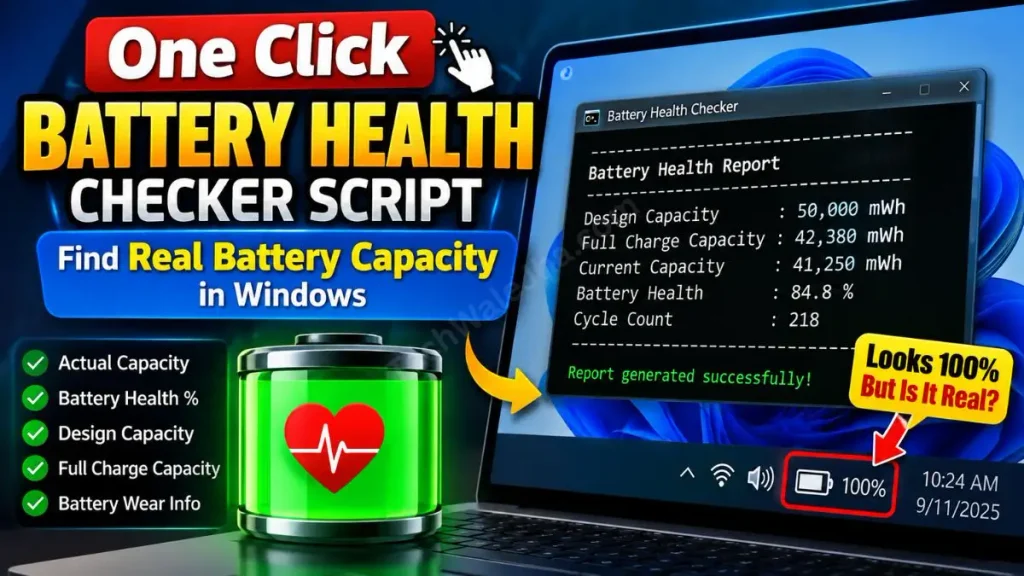
Have you ever had this happen: you charged your laptop overnight and the taskbar showed 100% battery, but as soon as you unplugged the charger, it dropped to 20% or even lower in a short time? Or maybe you went to the market to buy a second-hand (refurbished) laptop and the seller told you, “Bro, the battery is brand new,” but you want to find out its real condition? How would you do that? That’s where this Laptop Battery Health Checker Script comes in, from here you can run it with one click to check any laptop’s battery condition.
It’s been observed that most people rely solely on the battery icon in the bottom taskbar. But the truth is that a laptop’s battery is like a water tank. When a laptop is new, the battery holds its full capacity at 100% charge. But after 1-2 years of use, its chemical health starts to degrade, and even though it shows 100% charge, it doesn’t hold as much power. This is technically called Lithium-ion degradation, which you can read about in the detailed study on Battery University.
In such cases, if you’re just trying to fix a draining laptop battery by changing basic settings, to be honest you’re wasting your valuable time, because the real problem lies within the battery itself. To uncover the truth about your battery, you’ll need to use a powerful laptop battery health checker script that pulls original data directly from the motherboard and presents it to you.
Also Check This Tool: 1-Click Folder Locker Script For Windows: Hide & Lock Files Safely
What Details Will This Battery Checker Show?
When you download and run this 1-click battery checker I made, it will fetch data from Windows’ internal sensors. You don’t need to go to a mechanic at all; your laptop will automatically generate its complete ‘Medical Report’ for you in simple language.
Let’s understand the 3 most important things you need to look at in this battery report HTML in Windows 11:
Key Metrics in the Battery Health Report
| Battery Metric | Meaning | Why is it Important? |
|---|---|---|
| Design Capacity | When the laptop first came out of the factory, how powerful was the battery (e.g., 50,000 mWh)? | By checking the battery’s design capacity, you can determine the laptop’s original value. |
| Full Charge Capacity | As of today, when the battery is fully charged at 100%, how much power can it actually hold (e.g., 30,000 mWh)? | This is your battery’s actual health. It calculates the health percentage by comparing its design capacity with its full capacity. |
| Cycle Count | How many times has the laptop’s battery been charged from 0% to 100% so far? | A good laptop battery has a cycle count between 300 and 500. After that, the battery degrades. |
If you’re buying a refurbished laptop (for example, an HP, Dell, or Lenovo), instead of trusting the seller’s claims, just run this laptop battery health checker script for one second and immediately check the Cycle Count. That way you’ll know whether the seller is telling the truth or lying.
Also Check This Tool: 1-Click Windows Auto Repair Tool Script: Fix BSOD & Errors
Create the Battery Checker Script Manually (BAT Code)
Friends, as I always say, the difference between a tech expert and an average user is that the expert knows what’s running in the background, and the tech community always values originality and transparency. So, if you want to create your own laptop battery health checker script, you can easily do it using Notepad.
To create your own custom diagnostic tool, follow these simple steps below:
- Now, on your laptop, press the Windows Key, type Notepad in the search bar, and open it.
- Then, copy the code provided below and carefully paste it into Notepad:
@echo off
color 0B
echo =========================================
echo Battery Health Report Generator by Techwalejha.com
echo =========================================
echo.
echo Generating your laptop battery report...
powercfg /batteryreport /output "%USERPROFILE%\Desktop\Battery_Report.html"
echo.
echo Report Saved to Desktop! Opening automatically...
start "" "%USERPROFILE%\Desktop\Battery_Report.html"
pause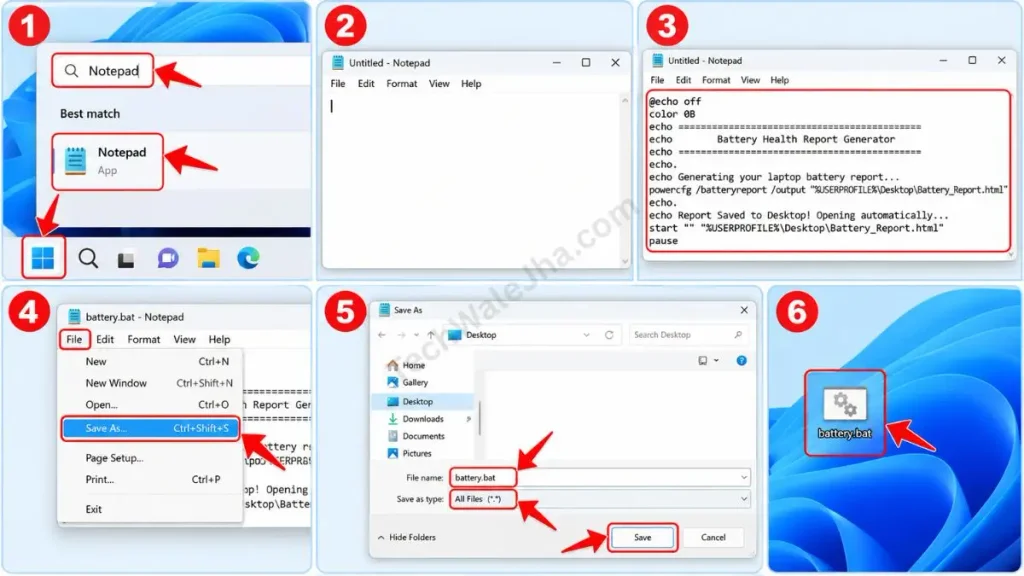
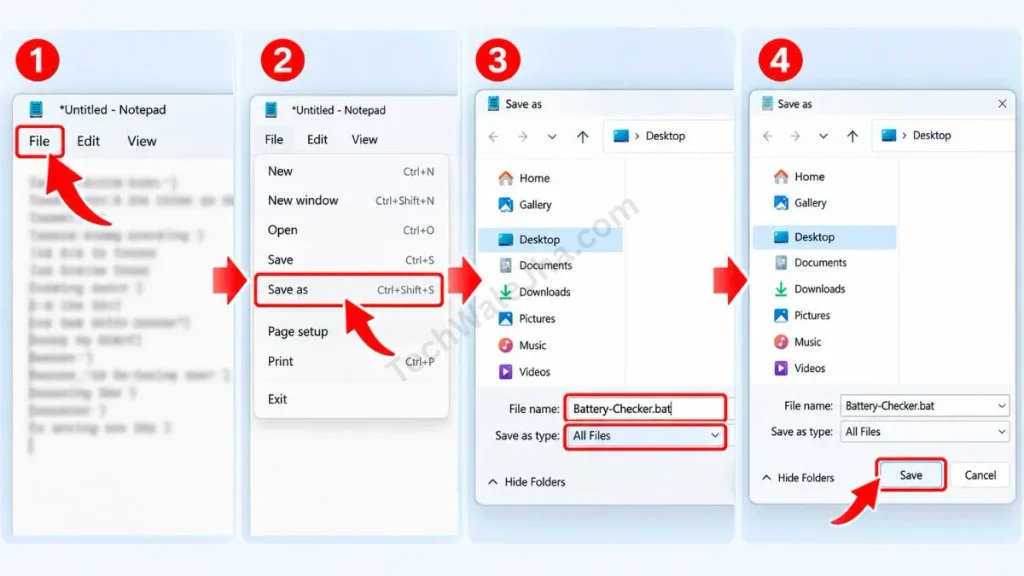
- After pasting the code into the notepad, click File in the top left and select Save As. A window will pop up; in the “Save as type” drop-down, select All Files, then type “Battery-Checker.bat” for the file name and save it to your Desktop.
Also Check This Tool: One Click Windows Telemetry Disable Script (Boost Speed 2026)
Line-by-Line Code Breakdown (How Does It Work?)
Let’s understand how this little piece of code generates such a detailed report:
powercfg /batteryreport: This is Windows’ most powerful built-in command. The powercfg battery report command fetches battery data directly from the motherboard’s ACPI (Advanced Configuration and Power Interface) sensors./output "%USERPROFILE%\Desktop\...: This part ensures that your battery report HTML is saved directly to your Windows 11 Desktop, so you don’t have to search for it.start “” ...: This is a smart automation trick. As soon as the report is saved, this command will automatically open it in your default web browser (like Chrome or Edge)!
Also Check This Tool: One Click Network Fixer Script: Fix WiFi No Internet Fast
Download the 1-Click Battery Health Checker (ZIP File)
If you don’t want to get bogged down in the technical details of coding and Notepad, and you’re looking for a completely error-free, ready-to-use tool (especially if you’re checking a laptop on the second-hand market), then don’t worry! I’ve already prepared this one-click battery checker download for you. You can download it right away from the link below.
Why did I pack this tool in ZIP format?
Often when we download a .bat (Batch) script directly from the internet, security features in Google Chrome, Microsoft Edge, or Windows Defender flag it as a “suspicious file” and block the download. That's why I have securely packed this file into a ZIP folder so that the download is completely smooth and the browser won't block it. This tool is 100% virus-free and safe, and I have also tested it myself.
Also Check This Tool: 1-Click Shortcut Virus Remover Script (Fix Pendrive)
How to Use the Tool and Read the Battery Report?
Friends, downloading the tool is very easy, but properly analyzing the report is the real technical skill. If you're testing a refurbished laptop battery, the seller will never tell you this trick! To use this script and read the report, just follow these 3 steps:
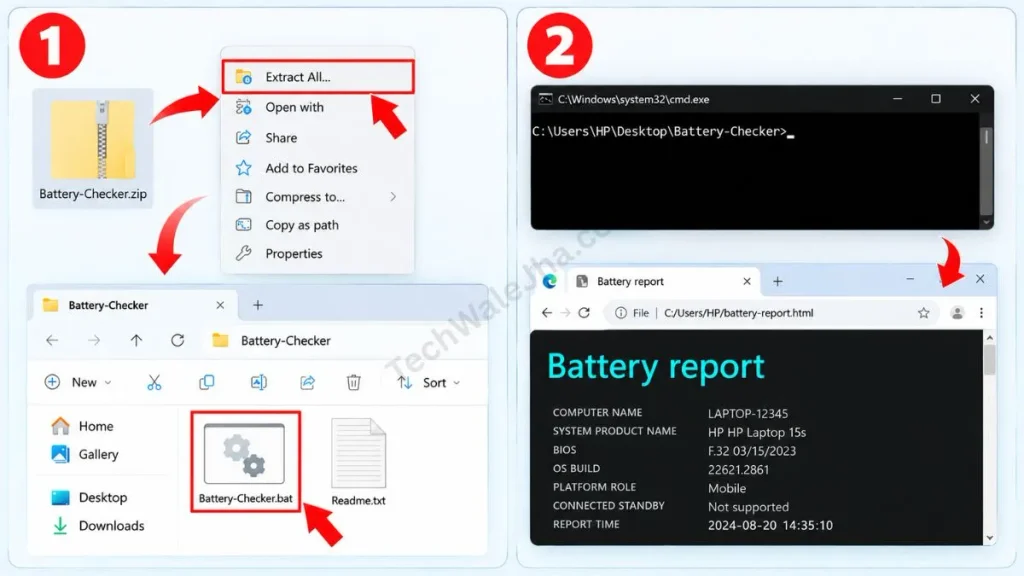
- Step 1: Run the Script: Extract the downloaded ZIP file. Now double-click on Battery-Checker.bat.
- Step 2: Auto-Generate Report: A black command prompt screen will appear. In a few seconds, your default browser (Chrome or Edge) will open with a detailed “Battery Report.”
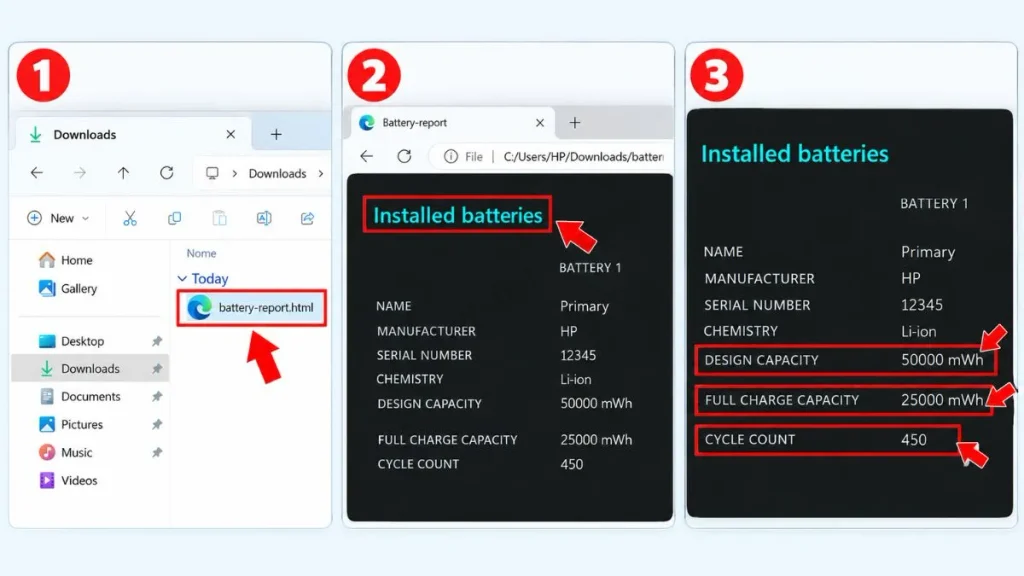
- Step 3: Calculate Actual Battery Health (Crucial Step): Scroll through the report to the “Installed Batteries” section. Here you will see 3 things:
- Design Capacity: (Let's say this is 50,000 mWh).
- Full Charge Capacity: (Let's say this is 25,000 mWh).
- Cycle Count: (e.g., 450).
What Does the Report Mean?
Your battery came from the factory with a 50,000 mAh capacity, but today it can only store 25,000 mAh of power. This means your battery's health is now only 50%. Even if the taskbar shows 100% charged, in reality it's operating at half its capacity. If your Full Charge Capacity drops to 50% or less, you will need to get your laptop battery replaced.
Also Check This Tool: 1-Click PC Speedup Script: Clean Temp & Cache Files Fast
Frequently Asked Questions (FAQs)
Will this tool work on a Desktop PC?
No. Desktop PCs do not have an internal battery (unless the UPS is smartly connected via USB). This Windows battery health script works perfectly only for Windows laptops and tablets (like the Surface Pro).
What is a good battery cycle count?
Normal laptop batteries maintain very good condition (80% health) for 300 to 500 charge cycles. If your laptop's battery cycle count has crossed 800 or 1000, the battery starts to degrade significantly.
Can this script fix my battery drain issue?
No, it's just a diagnostic (checking) tool. It generates a battery health report. To fix battery drain, you'll need to go into Windows settings, close heavy background apps, and lower the screen brightness.
Is the Battery Checker script safe to use?
Yes, 100% safe. This script only uses the official Windows powercfg command. It does not delete, modify, or change any files on your system.
Conclusion & Social Proof CTA
So friends, that was the fastest and smartest way to check your laptop's real battery condition without any extra software. Now, no one will be able to cheat you when selling you a second-hand laptop!
What did your Laptop's Battery Test Report show? What was your Design Capacity and how much of your Full Charge Capacity is left? Be sure to let us know in the comments below! Let's see whose battery is in the best condition.
For more advanced Windows tweaks, laptop troubleshooting, and daily tech hacks, don't forget to follow and subscribe to me, @TechWaleJha, on Instagram, Facebook, and YouTube. Until we meet again with another amazing trick, take care and goodbye.
Disclaimer: Friends, I have personally tested all the Batch (.bat) scripts provided in this article, and they are completely safe. However, since everyone's PC configuration is different, please use them at your own risk. Before running any system-level script, be sure to back up your important data. TechWaleJha, its author, or this website will not be held responsible for any unexpected data loss, system errors, or PC crashes. Please run the script exactly as per the steps provided and avoid making any unintended changes to the code.