
Friends, if the network suddenly goes down or the internet speed becomes so slow that you can’t get any important work done, the first thing that comes to mind is to talk to a customer care executive and have them fix the problem. But as soon as you call Jio customer care, a long computer-generated IVR voice starts playing, and you have no idea which button to press to speak with a real person. If you’re also frustrated with this problem and repeatedly searching for “how to talk to Jio customer care executive directly,” then let me first tell you the simple way to do it.
To speak directly with a Jio customer care executive, dial 198 (Toll-Free) from your phone. After the call connects, first select your language. You will then be given information about your current active plan and remaining data balance. After hearing these details, press 3 for “Network and Data complaints.” Then, when the “To speak with our advisor” option appears, press 9. After that, your call will be connected to a real customer care advisor, where you can directly tell them about your network or internet problem and easily get a solution.
This way, you won’t have to get tangled up in different IVR options or repeatedly search online. If the quick solution above doesn’t work for you, you’ll get a step-by-step detailed guide on how to bypass the automated IVR system and speak directly with Jio customer care without wasting your valuable time. So let’s get started.
Why Do People Get Stuck in the Jio IVR System?
You’ve probably noticed that these days, when you call any telecom company, the menu options are so long that you get frustrated just listening to them. But why does this happen?
In fact, Jio has millions of active users in India. If everyone called a live agent for every little issue like checking remaining data, finding out plan validity, or asking about a new recharge offer in this scenario their entire system would be crash. That’s why telecom companies rely on AI and pre-recorded IVR (Interactive Voice Response) systems so basic questions can be resolved there.
But the problem arises when your issue is complex, like money was deducted from your account but the recharge didn’t happen, or if your SIM card is lost. In such situations, you need to know how to smartly bypass the IVR to speak with an executive; otherwise, you’ll just keep pressing the wrong buttons and getting stuck in the menu, and your problem will remain unresolved.
Method 1: ‘198’ Toll-Free Trick (The Fastest Method)
If you are facing any issues with your phone’s network, calling, or internet, then calling 198 (Complaint Helpline) is the best and fastest option. This is a toll-free Jio customer care number, which means you won’t be charged even if you talk for hours.
How to Transfer a Call? (Step-by-Step):
- Now, from your phone, dial 198 from your Jio number (SIM).
- As soon as the call connects, the automated system will ask which language you would like to proceed in. Press ‘1’ for Hindi or ‘2’ for English.
- The system will now automatically tell you your remaining daily data and plan validity.
- As soon as the main menu starts, you need to select the “Internet speed, network or calling issues” option. In most areas, this option is number ‘3’.
- After that, in the sub-menu, you will hear an option at the end: “To speak with our customer care executive, press 9”. Just press ‘9’.
- After a few seconds of hold music, your line will be connected directly to a live agent.
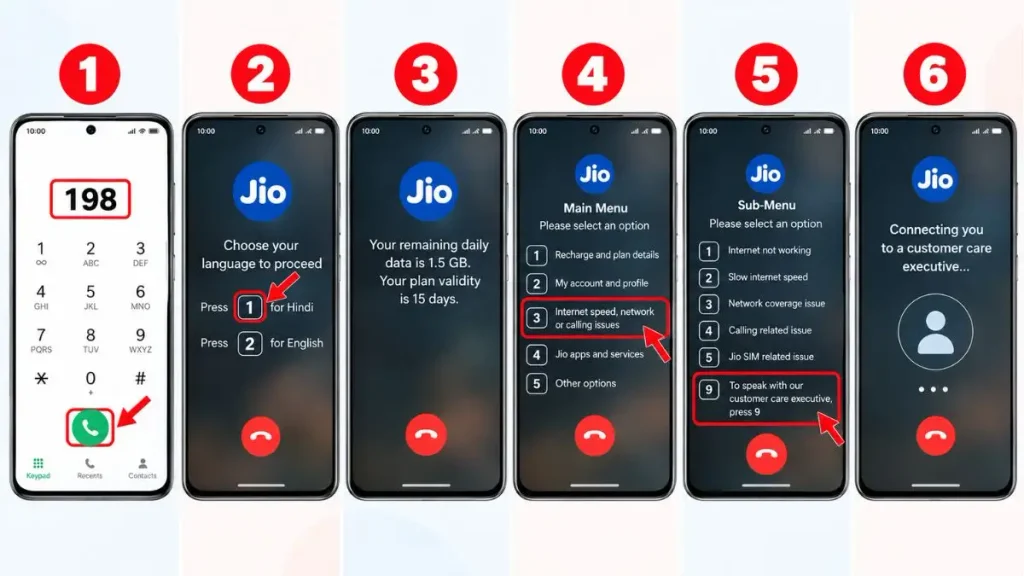
Direct Call Transfer Sequence
You can memorize this exact sequence of buttons from the table so you don’t have to listen to the long audio carefully every time:
| Call Progress (IVR) | Which button do you need to press? | Action Result |
|---|---|---|
| Welcome Prompt | 1 or 2 presses | The language (Hindi/English) will be set. |
| Account Info (Data/Validity) | Don’t hold back | Let my computer fully report my data status. |
| Main Menu Options | 3 presses | Select a network, Internet, or calling issue. |
| Final Sub-Menu | 9 presses | You will be connected directly to a Customer Care Executive. |
Method 2: MyJio App & WhatsApp Support (Smart Alternative)
Many times, a situation arises where the network in your area goes completely down, or when you dial the Jio customer care number for an internet issue, the line keeps getting busy. In such cases, you shouldn’t waste time trying to make a call; instead, you should use a smart method and get live chat support.
1. Via WhatsApp (Live Agent):
Jio has launched a dedicated and official 24/7 WhatsApp support for its users.
- Save this number, 70007 70007, as ‘Jio Support’ in your phone’s contact list.
- After that, open your WhatsApp and send “Hi” or “Hello” to this number.
- In the menu, you will see many options; select “Chat with Agent” from them. This way, you can easily chat with Jio customer care, and a live executive will resolve your issue.
2. Via the MyJio App:
If you want to know how to connect with Jio customer care quickly without saving any number, then the MyJio app is the best option.
- To do this, open the MyJio app on your phone.
- Click on the bottom menu (three lines) and go to ‘JioCare: Help & Support’.
- Scroll down and you will find the ‘Chat with us’ option. Click on it to connect directly with the support team.
Note: If you are continuously facing network problems and your issue has not been resolved for months even after speaking with customer care, then TRAI is the last resort. You can go to the Telecom Regulatory Authority of India (TRAI)’s Official Consumer Info website to read the rules and escalate a complaint regarding your rights and telecom disputes. This authority regulates all telecom companies.
Special Numbers for JioFiber and Porting (MNP)
Please note that 198 is only for Jio mobile SIM (prepaid or postpaid) users. If you use other Reliance products, it’s better to dial their dedicated direct toll-free number instead of navigating the IVR menu:
- JioFiber Support: If your home Wi-Fi is showing a red light or you’re not getting any speed, you need to dial 1800-896-9999 to have a Jio Fiber customer care executive come out.
- New Connection or MNP: If you want to port your number to Jio from Airtel or Vi, or buy a Jio phone, call their sales helpline at 1800-889-9999.
- Corporate & Business: For enterprise users with bulk connections, a VIP helpline number 1800-889-9333 is available where the waiting time is virtually zero.
Frequently Asked Questions
My phone is lost. Can I call Jio customer care from another network (Airtel, Vi)?
Yes, absolutely. If your phone has been stolen or your SIM has been damaged, you can dial the Reliance Jio complaint number 1800-889-9999 from any other network. This number is accessible from all networks and is completely toll-free.
Does 198 (the 24×7 Jio helpline number) really stay open at night?
Yes, the 198 helpline is active 24×7 (all seven days of the week). The IVR system is always available, but if you want to speak with a live human executive immediately without waiting, the best time is between 10 AM and 4 PM.
Why doesn’t an executive pick up after I press ‘9’ on the IVR?
Often during peak hours (like in the evening), they are under a very high call volume. In such cases, the “All our executives are currently busy” audio will start playing. In this situation, you should not disconnect the call and should stay on hold for 2-3 minutes. As soon as an agent becomes free, your call will be automatically connected.
Conclusion
Friends, whether the internet stops working or you suddenly get a balance cut message, it’s very important to call the right number at the right time. I hope this guide has made it clear to you how to talk to Jio customer care executive, and you won’t waste your time listening to long IVR machine prompts.
So, the next time you have a problem, just call 198 directly, press ‘3’, and then ‘9’ to get your issue resolved right away. What’s your most common issue? Internet speed or call drops? Be sure to let us know in the comments below, and stay connected with our TechWaleJha platform to easily learn more tech tips, troubleshooting guides, and tech hacks like these.
Disclaimer: This information is for educational and informational purposes only. Jio’s customer care numbers and IVR menu options may change from time to time according to the company’s policies. During any call, do not share your OTP, bank account details, or UPI PIN with anyone (genuine customer care will never ask you for your OTP). Our platform will not be responsible for any third-party fraud or changes in information. Always visit the official MyJio app or Jio’s website for the latest updates.