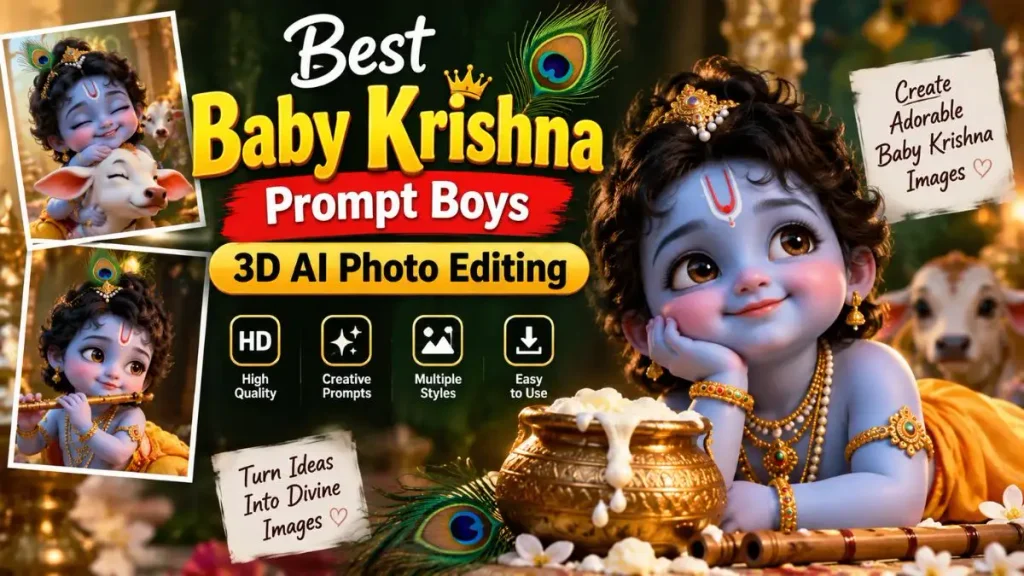
Friends, these days as soon as you open Instagram, Facebook, and WhatsApp, the one thing you see most often in your feed is these super cute, realistic 3D AI photos. Especially during the festival season, photos of a little child playing with Lord Krishna or eating butter go viral like wildfire. Everyone wants their DP (Display Picture) to feature a cool baby Krishna 3D AI photo with their own name on it.
But the problem is, how do you create such a high-quality and realistic 3D image? People think they might need heavy Photoshop or expensive editing software for this. But the truth is that in this smart AI world of 2026, you can create your own viral photo with just a few copy-paste text prompts. For this, you just need to know the secret of the best Janmashtami AI photo editing.
In this article, I’ve brought you an exclusive list of the most viral and tested “Best Baby Krishna Prompt Boys.” Using these text prompts, you can easily create AI photos on your phone completely free with Bing Image Creator. So let’s make your social media a bit more devotional and trendy, all without any design experience.
Why Are AI Baby Krishna Photos Trending Everywhere?
If you ask anyone what’s trending on the internet these days, ‘3D AI Illusion Images’ will be at the top of the list. But why has the trend of the ‘baby krishna prompt for boys’ suddenly become so viral? It’s not just technology behind this, but our culture and emotions are also intertwined.
Let’s look at the top reasons why these AI photos are everywhere:
- The Emotional & Cultural Connection: The childhood stories of Lord Krishna (Baby Krishna) have been beloved by everyone since childhood. When we see a modern 3D AI photo of a little boy playing the flute with him or stealing butter, it truly touches the heart. If you want to understand the cultural history and deep significance of this festival, you can read Wikipedia’s official page on Krishna Janmashtami, where you will learn a lot.
- The Power of Personalization (Name on T-Shirt): The biggest magic of this viral Instagram AI editing is that you can boldly write your name, your younger brother’s name, or your son’s name on the T-shirt in the photo. When people see such a cute 3D photo with their name on it, they feel it was designed specifically for them, and they immediately set it as their WhatsApp status.
- No Editing Skills Needed: Previously, creating such 3D art in tools like Blender or Maya would take days. But now, the Bing AI image generator (DALL-E 3) has made this process 10 seconds long. You don’t have to pick up a brush at all; you just type a text prompt on your phone, and the AI will generate everything for you.
So friends, this isn’t just a photo; it’s a very beautiful combination of digital devotion and technology.
Also Check Out This Prompts: 200+ Best AI Prompt Commands for ChatGPT & Gemini
The Best Baby Krishna Prompts for Boys (Copy & Paste)
Here we’ll look at prompts for two different situations (scenes). One where a boy is playing the flute, and the other, the cutest one, is the butter-stealing scene! Both prompts are trending at the top of the Best Baby Krishna prompt list for boys.
Prompt 1: Cute Boy Playing Flute with Krishna
This prompt creates a very peaceful and beautiful scene where a little boy is playing the bansuri (flute) with Lord Krishna, and the surrounding environment is absolutely magical and glowing.
👇 Copy This Prompt:
“A realistic 3D illusion image of a cute 10-year-old Indian boy playing a golden flute alongside cute Baby Krishna. The boy is wearing a casual bright yellow T-shirt with the name ‘RAHUL’ written boldly on it. Baby Krishna is wearing traditional jewelry and a peacock feather on his head. They are sitting under a beautiful glowing tree with magical fireflies around them, highly detailed, 8k resolution, cinematic lighting.”
Prompt 2: Boy Sitting on Butter Pot with Krishna
How can the Janmashtami festival be complete without butter? This second prompt creates a very naughty and cute scene in which the boy and Baby Krishna are sitting by a dahi-handi (butter pot).
👇 Copy This Prompt:
“A cute 3D realistic AI photo of a 12-year-old Indian boy eating white butter from a traditional clay pot (Matka) with cute Baby Lord Krishna. The boy is wearing a trendy blue hoodie with the name ‘AMAN’ written in bold white 3D letters on it. Baby Krishna has butter on his face, wearing a peacock feather crown. The background is a beautifully decorated ancient Indian village with flower garlands, hyper-realistic, 4k.”
Note: In the prompts where “RAHUL” or “AMAN” is written, you can write your own name if you wish!
Step-by-Step: How to Generate Baby Krishna 3D AI Photos
Now that you have these viral Bing image creator prompts, let’s see how to use them to create an actual photo. To create this image, we will use the Microsoft Bing Image Creator because it is based on DALL-E 3 technology and is completely free.
Follow these simple steps on your smartphone or laptop:
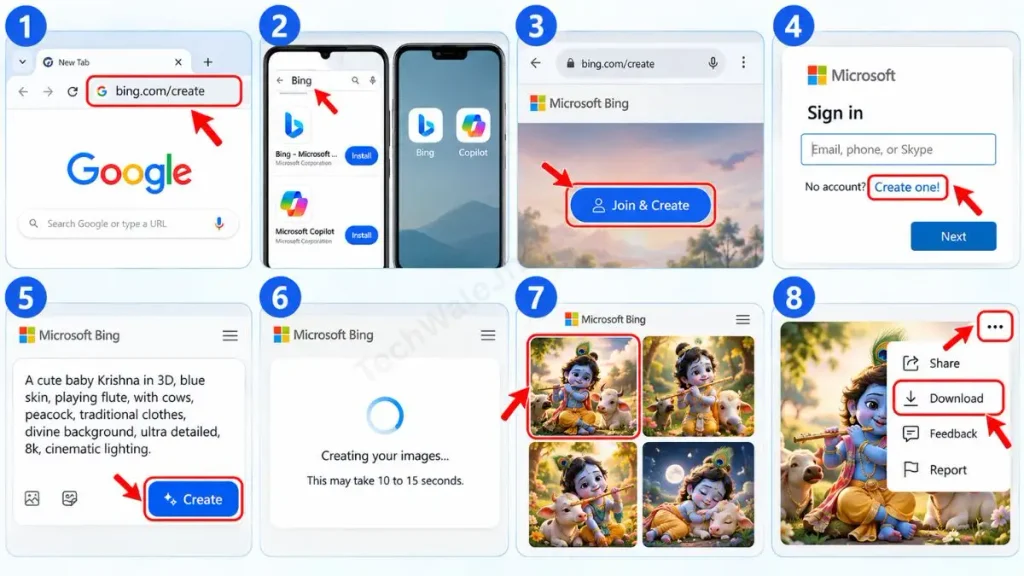
- Now, type bing.com/create into your Google Chrome or any browser. You can also download the ‘Bing’ or ‘Microsoft Copilot’ app from the Play Store.
- Once the website opens, click the “Join & Create” button. Here you’ll need to log in with your Microsoft account, Outlook, or Hotmail ID. If you don’t have an account, you can create one for free by clicking “Create one.”
- After logging in, you will see a large, empty text box at the top. Paste any of the baby Krishna 3D AI photo prompts mentioned above there.
- After pasting the prompt, press the ‘Create’ button. Now the AI will work its magic! This process may take 10 to 15 seconds.
- The AI will generate 4 different, amazing variations for you. Click on the photo you like the most. Then, click the 3-dots (…) on the side and press the Download button. After that, your HD photo will be saved directly to your gallery.
Pro Tip: Customize the AI prompt with your name
Many people directly copy prompts from the internet, and the same “Rahul” or “Aman” ends up written in their photos. To be a smart creator, you need a bit of prompt engineering. You can make this Best Baby Krishna prompt boys even more personal and unique by making small changes:
- Change the Name: Wherever I have written ‘RAHUL’ or ‘AMAN’ in the prompt, you need to remove that word and write your own name (like ‘VIKAS’ or ‘KABIR’). Make sure to write the name in single quotes (‘ ’) and in CAPITAL letters so that the AI can print it clearly on the T-shirt.
- Change the Age: If you’re creating a photo for your 5-year-old nephew or son, write “5-year-old toddler” instead of “10-year-old” in the prompt. The AI will automatically adjust the child’s height and face.
- Change the Outfit: If you don’t like the color yellow, you can remove “bright yellow T-shirt” from the prompt and write “black hoodie” or “traditional red kurta” instead. The result will be even more awesome!
Just by tweaking these small details, you can give your Janmashtami AI photo editing a completely unique look.
Also Check Out This Prompts: How to Create a Realistic AI Bullet-Time Video Effect in 2026
Frequently Asked Questions
Is the Bing Image Creator completely free to use?
Yes, absolutely! Microsoft’s Bing AI image generator is completely free. When you create a new account, you get 15 “Boosts” (golden coins) daily. It takes 1 boost to generate a photo. If you run out of boosts, you can still create photos for free; it will just take a little extra time (1-2 minutes).
How do I download these AI photos to my phone’s gallery?
When the AI generates 4 images for you, tap (click) on your favorite image to enlarge it. Then, you will see 3 dots (…) below or on the side of the photo. Click on them and select Download. The photo will be saved directly to your gallery in HD quality.
Can I use these same prompts for a baby girl?
100% yes! You just need to replace “cute 10-year-old Indian boy” with “cute 10-year-old Indian girl” in the prompts from this article, and write a girl’s name (like ‘SNEHA’) on the T-shirt. The AI will instantly generate a photo of a beautiful girl.
Conclusion
Friends, I hope that after reading this detailed guide, you now understand the complete formula for creating the best Baby Krishna prompt boys and Baby Krishna 3D AI photos. Now, you don’t need to pay anyone or have someone else edit the photos for you. Just copy the prompts here, paste them into Bing, and get your photo ready.
For AI tools, photo editing tricks, and tech tips to make your social media even more attractive and viral, stay connected with our channel and blog @TechWaleJha. We make technical things so easy that any user can become a pro-creator.
What name did you write on your photo? Be sure to let us know in the comments below!